

Unity Signature Verification Example
Intro
In some cases, there is no available option to use server-to-server communication to ensure that all interactions with Neon are secure and valid. A common example is games that cannot receive webhooks and therefore do not have a backend service to validate responses or events from Neon. In such cases, the game client is the only component interacting with Neon.
In a fully serverless model, the client must be able to cryptographically verify that responses returned from Neon are valid and safe, since there is no server to establish trust.
For this purpose, Neon uses the well-established and widely adopted Ed25519 digital signature scheme. This ensures that communication between the game client and Neon is both authentic and tamper-proof, even without a server.
More details about the serverless integration flow are available in the main integration article.
In this document, we’ll focus specifically on how to perform Ed25519 signature verification on the game-engine side.
Example in Unity
Because Unity uses a specific and limited version of .NET and it does not include a built-in cryptography API for Ed25519 verification - Unity can still verify Ed25519 signatures using a pure C# implementation. There are several lightweight and reliable C# libraries that support Ed25519 verification.
In this example, we’ll focus on a simple and well-known solution: Chaos.NaCl - a lightweight, fast, and widely adopted library in both .NET and Unity projects. You're not limited to any other libraries until they support Ed25519 and are safe and reliable.
We also prepared a short example demonstrating how to use this library inside Unity. This example was tested with Unity 6000.2.15f, and on real devices running Android 11 and iOS 15.5.
Step By Step
1. Preparation
Add the Chaos.NaCl folder to your Unity project, or contact us and we'll share the Unity package which we prepared based on that repo.
2. Test script
You can now add the using Chaos.NaCl;directive to your scripts.
To test Ed25519 verification, you can:
- Use online tools to generate a public key, signature, and message, or
- using a (sandbox) response from
PATCH /client/purchase/{purchaseId}/claimorGET /client/purchases/unclaimed.
In both cases, you can validate the signature using a script like this:
using UnityEngine;
using System;
using System.Text;
using Chaos.NaCl;

public class Ed25519Verifier : MonoBehaviour
{
    [Header("Test values")]
    [TextArea] public string publicKeyBase64;
    [TextArea] public string signatureBase64;
    [TextArea] public string message;

    void Start()
    {
        try
        {
            string pub = DecodePemPublicKey(publicKeyBase64);
            string sig = NormalizeBase64(signatureBase64);

            byte[] publicKey = Convert.FromBase64String(pub);
            byte[] signature = Convert.FromBase64String(sig);
            byte[] msgBytes  = Encoding.UTF8.GetBytes(message);

            Debug.Log($"PublicKey len: {publicKey.Length} (must be 32)");
            Debug.Log($"Signature len: {signature.Length} (must be 64)");

            bool ok = Ed25519.Verify(signature, msgBytes, publicKey);
            Debug.Log("signature valid? " + ok);
        }
        catch (Exception ex)
        {
            Debug.LogError("Verification error: " + ex);
        }
    }

    private string NormalizeBase64(string s)
    {
        if (string.IsNullOrWhiteSpace(s))
            return s;

        s = s.Trim().Replace('-', '+').Replace('_', '/');

        int padding = 4 - (s.Length % 4);
        if (padding < 4) s += new string('=', padding);

        return s;
    }

/* Normalizes a Base64 / Base64URL-encoded Ed25519 public key for Unity and extracts
   the raw 32-byte public key required by Chaos.NaCl verification.
   Supports Raw 32-byte Ed25519 public keys as well as ASN.1 (SPKI) structured Ed25519 public keys */
    private string DecodePemPublicKey(string pem)
    {
        string base64 = NormalizeBase64(pem);

        byte[] der = Convert.FromBase64String(base64);

        if (der.Length < 32)
           throw new Exception("Invalid public key: decoded data too short");

         // Case A: already raw 32-byte key - return as-is
         if (der.Length == 32)
            return Convert.ToBase64String(der);

         // Case B: DER/SPKI - take last 32 bytes
         // For Ed25519 the raw public key is contained in the final 32 bytes of the SPKI structure.
         // (Neon provides a PEM-formatted X.509 SPKI Ed25519 public key)
         if (der.Length > 32)
         {
            byte[] rawKey = new byte[32];
            Buffer.BlockCopy(der, der.Length - 32, rawKey, 0, 32);
            return Convert.ToBase64String(rawKey);
         }

         throw new Exception("Invalid public key length");
    }
}
Result of this demo script:
The Unity Console outputs the result of the Ed25519 signature verification performed using Chaos.NaCl:
bool ok = Ed25519.Verify(signature, msgBytes, publicKey);
Debug.Log("signature valid? " + ok);
Below is an example from the Unity Logs showing the verification status for the values provided to the Ed25519Verifier script.
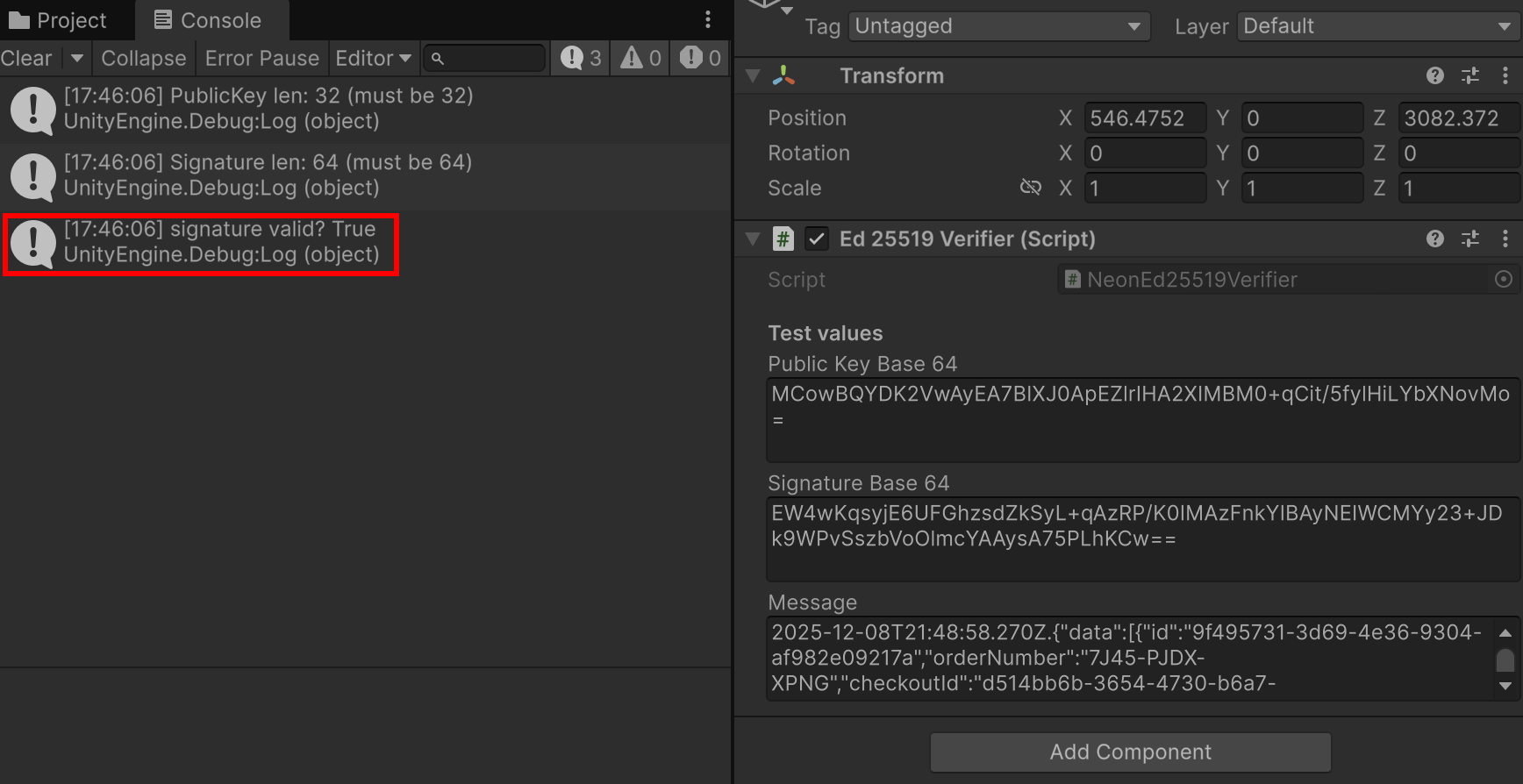
Unity Logs showing the verification status of the values provided to the Ed25519Verifier class.
Please note that this script demonstrates how to use a cryptographic library to validate a response signature only. It does not cover token rotation or response timestamp validation. For more information, please refer to the the main integration article.
Updated 4 months ago