

High-Level Flow
This article explains the high-level integration flow for implementing Serverless Checkout.
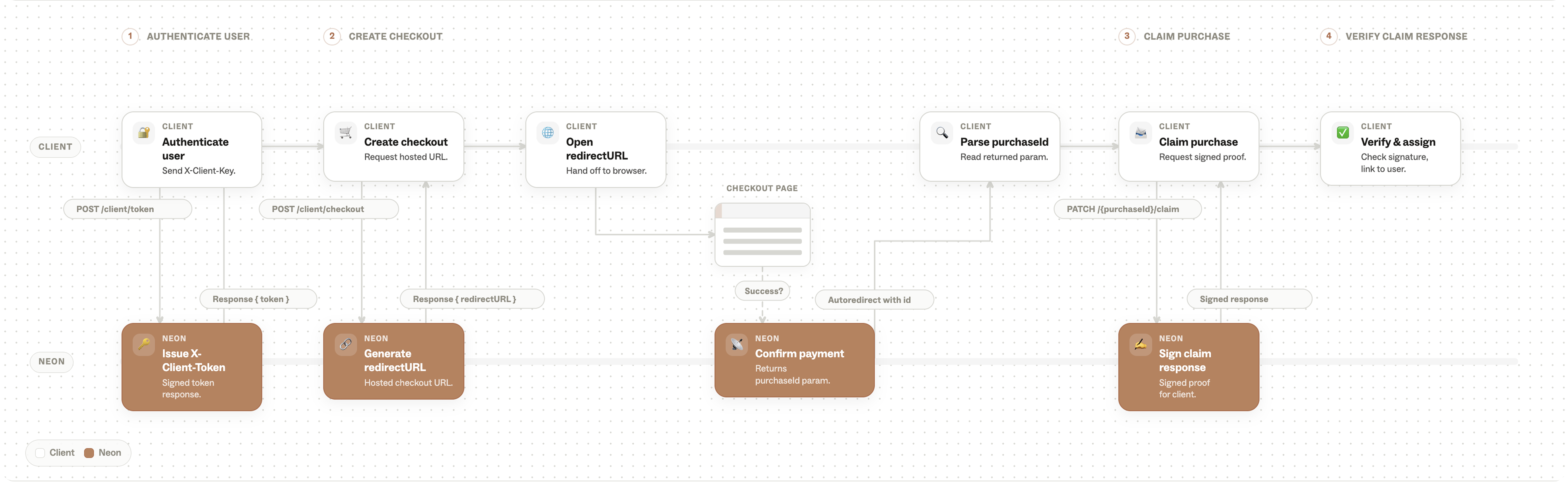
The diagram below illustrates how the client application communicates with Neon infrastructure during checkout creation, payment completion, and purchase claiming.
Prerequisites
Before starting, make sure that:
- You have access to the Neon Console and have created API keys
- Your application supports deep linking, allowing users to be redirected back into the game or app after purchase completion
Serverless Checkout Integration Flow
1. Configure the visual theme for your Checkout page.
(if not already configured)
2. Configure items and offers.
Add items and offers to the Neon system.
3. Identify the user’s location.
Determine the user’s location using your own services or application logic.
4. Determine whether Neon can be used.
Based on the user’s region and your application logic, determine whether Neon Checkout should be shown as an available payment method.
5. Serverless API Integration
The remaining integration steps involve secure client-side checkout generation, purchase validation, and fulfillment flows.
This implementation includes:
- Generating a client token for secure API communication
- Creating Serverless Checkout sessions from the client
- Redirecting users back to the app using configured deep links
- Parsing purchase information returned after payment completion
- Claiming purchases and assigning items to the user
- Handling unclaimed purchases in cases where the user does not immediately return to the app
Updated 5 months ago
Did this page help you?