

Daily Streaks
Daily Streaks are time-bounded campaigns that give players one claimable offer per day, with a bonus offer on the final day. Players claim in sequence — day one first, then day two, and so on — which creates a reason to return every day for the length of the campaign.
What Daily Streaks are
A streak is a scheduled campaign (typically one week long) made up of a set of streak offers — one offer per day plus a final bonus. Players must claim each day in sequence, and the bonus unlocks once the final day is claimed. When a player claims the day's offer, they're shown a claim confirmation that can optionally feature a Neon Shop offer, giving you a natural opportunity to drive store traffic from an engaged player.
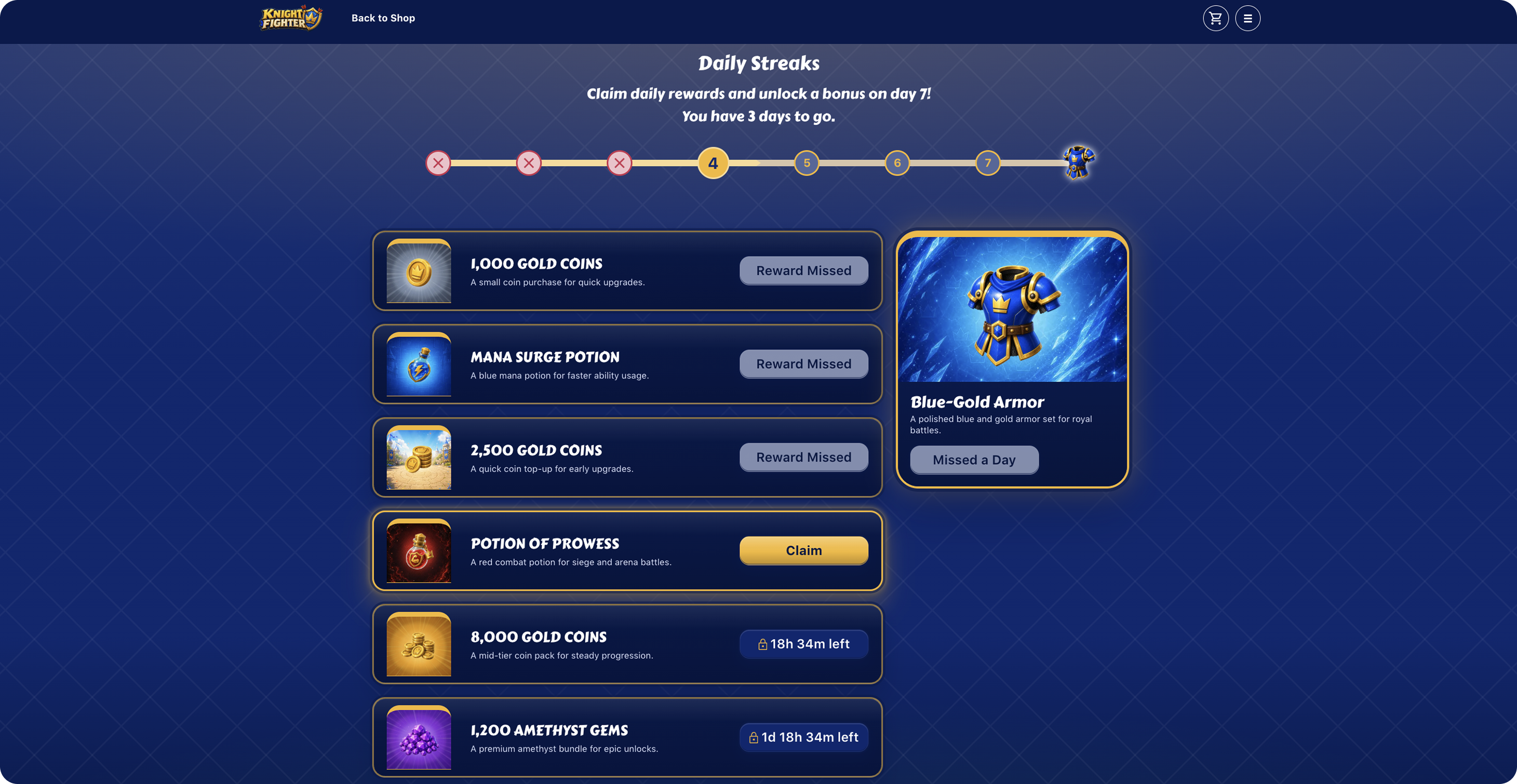
Streaks run for a fixed date range. When the end time passes, the streak expires and players can no longer claim it. To keep a streak running week over week, create a new streak for each date range (or clone an existing one).
Why use Daily Streaks
- Daily retention. Sequential claims give players a compelling reason to open your game every day.
- Offer discovery. The claim modal can surface a Neon Shop offer, turning a free claim into a Neon Shop visit.
- Fast to operate. Weekly streaks can be cloned forward with new dates in a couple of clicks, so a recurring cadence costs almost no ongoing setup.
- Easy to experiment. Each streak is its own campaign, so you can test different offer mixes, durations, or themes week over week.
Key concepts
Streak. A set of offers plus a reward offer for a given date range (usually one week). Every streak has a unique id (UUID) and a new streak must exist for every date range — e.g., the streak running Jan 1 – Jan 7 is a different streak from Jan 8 – Jan 14.
Streak Offer. The offers players can claim during the streak. Typically there is one streak offer per day, plus a bonus offer on the final day.
Featured Offer. A Neon Shop offer shown on the claim modal after a player claims a streak offer. Featured offers are an opportunity to route engaged players toward a paid offer.
Banner Image. The background image for the large hero at the top of the shop while the streak is running.
Final Reward Label. Each streak offer card shows a pill in the top right with the day (e.g., Day 1, Day 2). The bonus offer shows the Final Reward Label text in that pill instead of a day number.
Streak setup
Every SKU you plan to use in a streak must already exist in your Offers and must have an image and a description for every translation. Streaks will refuse to save otherwise.
Create a streak
Navigate to Property → Environment → Daily Streaks in the console and click Create New Streak.
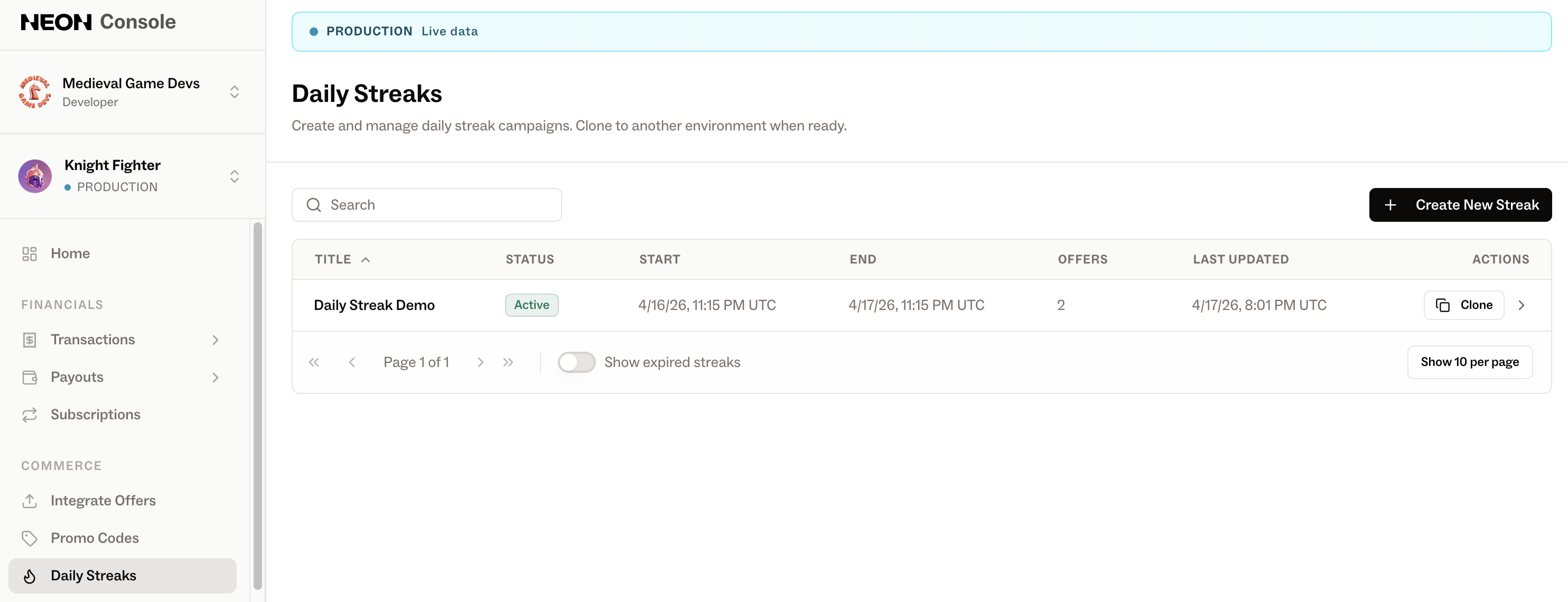
- Fill in Streak Details.
- Timezone — used to interpret the start and end times. UTC by default.
- Start date and time — must be in the future.
- Number of days — 1–7. The end date is calculated automatically.
- Banner image — pick from your existing brand images or upload a new image.
- Title and Final Reward Label — per translation; English is required.
- Add Streak Offers. You'll see
number_of_days + 1slots: one per day plus a Bonus on the final day. Pick a SKU for each slot. Drag slots to reorder if you want to change the sequence. - (Optional) Add a Featured Offer. A featured offer is shown inside the claim modal after the player claims the day's streak offer. The SKU highlighted here must not be hidden from the Neon Shop.
- (Optional) Add Per-Day Featured Offers. These are featured offers scoped to a specific day rather than the whole streak, and they take precedence over a streak-wide featured offer. So if day 1 has its own featured offer, players see that on day 1 instead of the streak-wide one.
- Click Create Streak.
The streak's status auto-sets to Scheduled, flips to Active at the start time, and becomes Expired after the end time.
Manage existing streaks
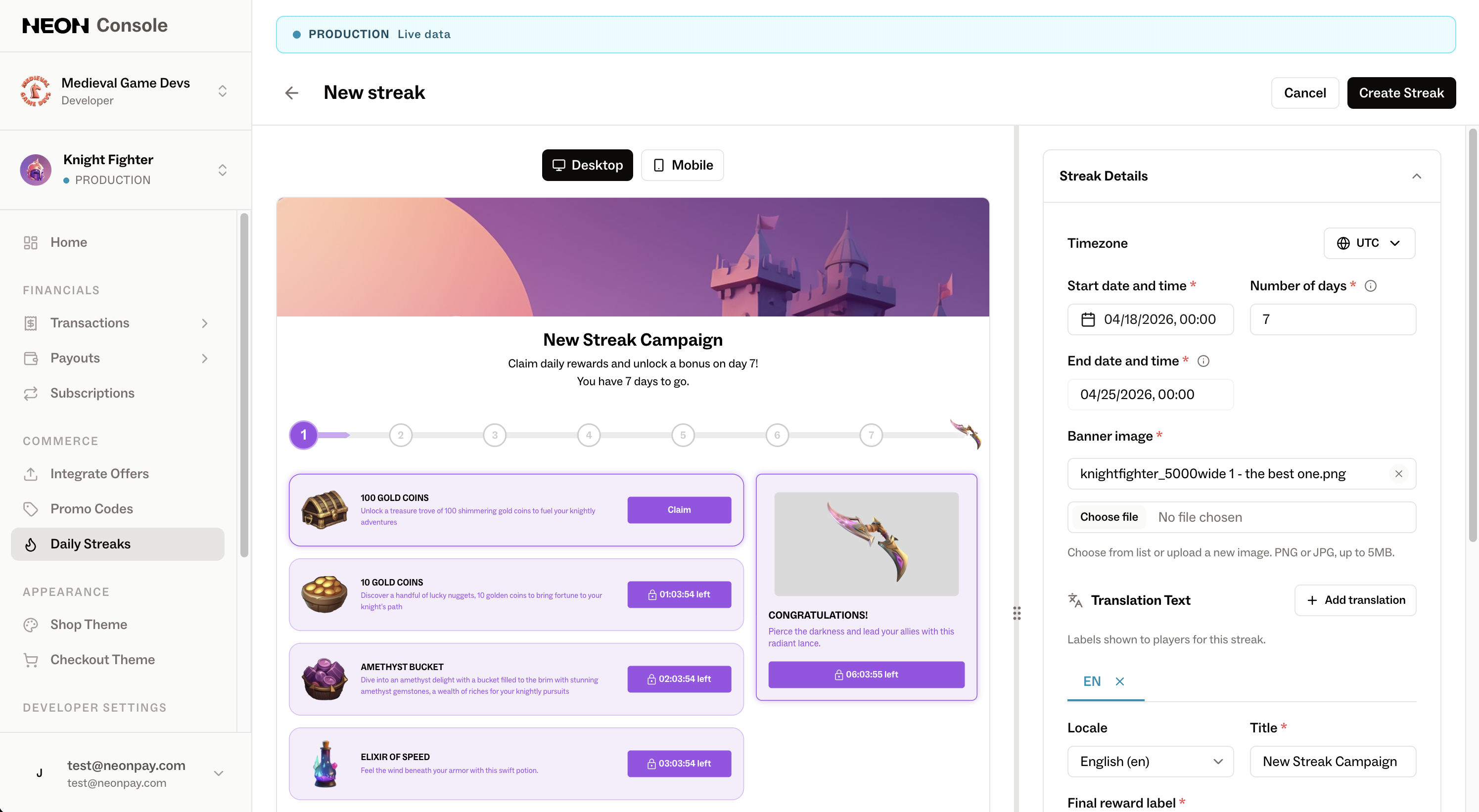
From the Daily Streaks list:
- Edit. Click any row to edit. Active streaks are editable, but you cannot shorten a streak below days that have already been claimed.
- Clone. Available from the row action menu or the detail header. Cloning duplicates a streak into any environment with new dates. Cross-environment clones copy images automatically. Cloning is the recommended way to set up each new weekly streak.
- Delete. Available from the detail header. Permanent — players immediately lose access to the campaign, and the action cannot be undone.
- Show expired streaks — toggle the switch above the list to reveal past campaigns.
No integration changes are necessary
No integration changes are required to ship Daily Streaks. If your game already integrates offer fulfillment, streaks work out of the box the same as any other free item redemption.
Fulfillment happens through your existing purchase.completed webhook, keyed on the offer SKU. Each streak offer — including the bonus — is fulfilled the same way as any other offer in your catalog, so the claim event you receive on the server side is indistinguishable from a normal offer purchase. No new event types, endpoints, or client SDK changes.
Practically, this means enabling streaks is a console-only configuration: as long as the SKUs you put in a streak are in your offer inventory and wired up in your fulfillment code, you're done.
Common gotchas
Cannot create streak. An offer referenced by the streak is missing an image or description for at least one translation. The save modal lists which offers need fixing — update them in Integrate Offers, then re-save.
Cannot delete or update an offer. The offer is used by an active or future streak. Remove it from the streak first, then retry.
Cannot publish inventory. A CSV upload would leave a streak-referenced offer misconfigured. Either include image + description for every translation in the CSV, or remove the offer from the streak first.
Reducing days is blocked. You cannot shorten an active streak below days that players have already claimed. To shrink a streak, do so before those days are claimed, or let the current streak expire and create a shorter one next cycle.
Updated 4 months ago